How I Run Claude Code
Most users know four slash commands. I live in fifteen. After six months and four shipped agents, here's the daily rhythm, command arsenal, hooks, and context hygiene that turned Claude Code into the OS layer for my company.
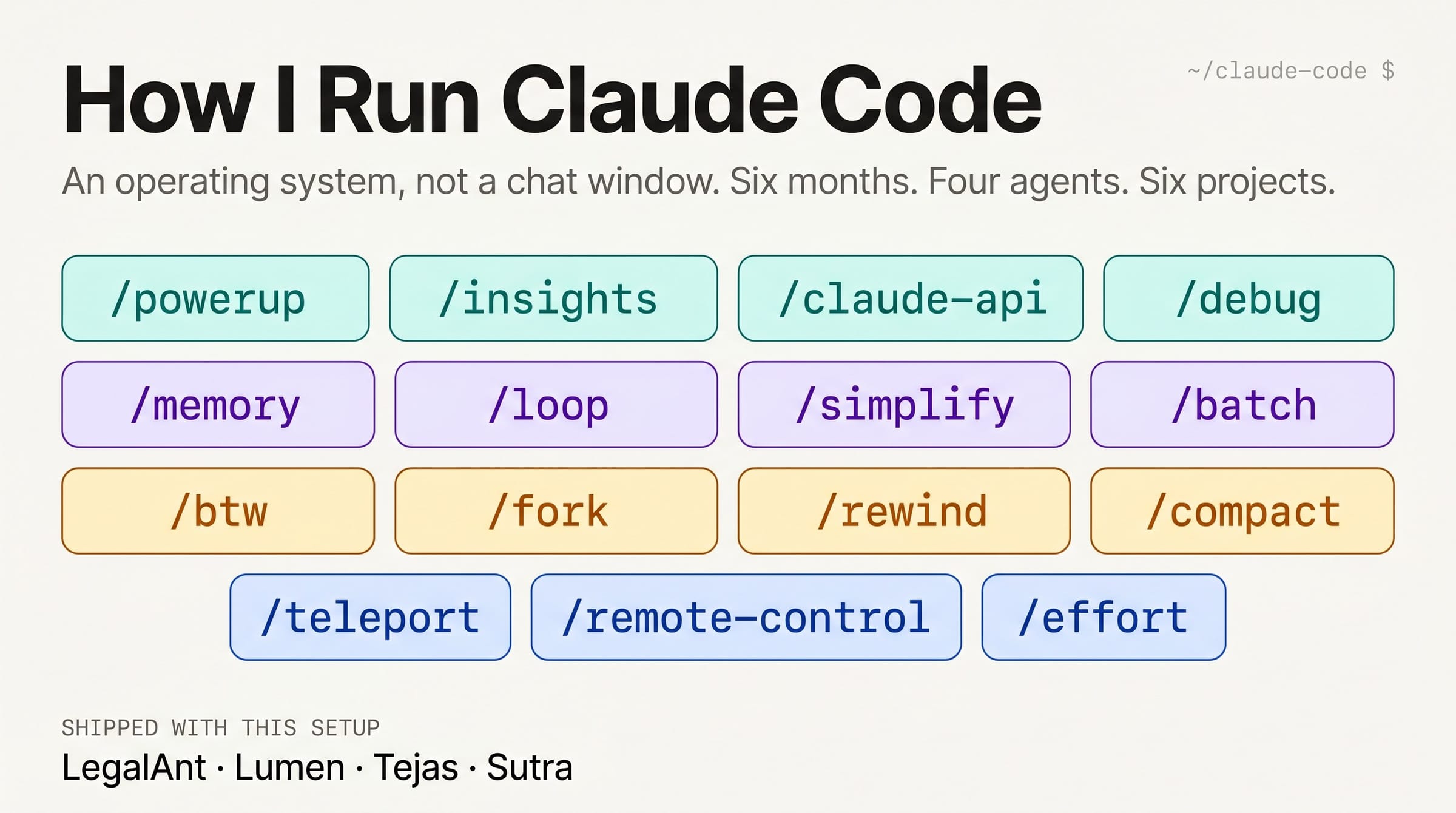
Six months in, four agents shipped, six projects running in parallel. The setup that turned Claude Code into the Growth OS layer for my business.
I built MockRabbit, a mock interview practice app using AI/ML/NLP and I have been using AI tools since ChatGPT was launched in 2023. Six months ago I wanted to start building AI Agents, but I couldn't. I had run product and tech for thirty years, including award-winning software, India's first OTT platform and the world's first in-car streaming box, but because I stopped actively coding from 2012, I wasn’t able to move even an inch further.
After 6-months of learning, I run four. LegalAnt is an eighteen-agent system for Indian legal work, open-sourced on the Claude Code marketplace. Lumen is an AI Product OS with eighteen agents and six workflows, also published. Tejas is my own code agent, built on OpenClaw and running on a static-IP Linux box, where it serves as the build layer for everything else. Sutra is the newest of the four, still finding its shape.
Most weeks I have six projects running in parallel. The lessons from LegalAnt shaped Lumen's design, Tejas became the build harness for both, and by the time I started Sutra, half the work was already done because the patterns were sitting in my CLAUDE.md files.
The shift wasn't learning to code better. It was learning to use AI Coding tools like Claude Code as an operating system, not a chat window. I always wondered about how to set it up once, leave state behind, spawn workers, and wall off context when it drifts. Finally, I see the day when you stop prompting and start operating. For me the unlock was /memory, when I noticed after a week on Lumen that I had stopped explaining the agent setup again every morning.
Here’s my learnings and undocumented tricks that can help you achieve the pro-level mastery of using Claude Code within a few days.
The 10-minute daily rhythm
Skip this and the rest doesn't work. The full loop takes about ten minutes a day.
Morning, two to three minutes. I open the project branch and let Claude scan the repo, read CLAUDE.md, and confirm the test commands. Then I force a plan with one phrase: "Outline stages, likely files, risks, and what done looks like before touching any code." That habit catches more bad choices than any review I've done, when building a new agent where the wrong choice in hour one means redoing eighteen files in hour eight.
I decide isolation up front, before I start. For Lumen and LegalAnt feature work, one worktree per agent. For Tejas, one session is fine. The decision happens before you start, not after the first session gets messy.
Then /memory to load persistent lessons, and a /loop for any ongoing check the day needs. My Lumen default is /loop 30m run the test suite and summarize failures.
During the day, three rules. Keep the main thread pristine, since side questions belong in /btw. Anything you repeat twice becomes a skill or custom command, not five times. Verify after every real change, not at end of day.
Evening, three minutes. A cleanup pass for loose ends and unfinished notes. An update to CLAUDE.md with anything tomorrow's session must know. Stale loops killed, and a crisp handoff note at the top before shutting down.
The handoff note is what makes the difference. Without it, every morning starts at zero, and with it, every morning starts where last night left off.
The command arsenal
Most users know maybe four slash commands. I live at fifteen.
/powerup runs live lessons with animated demos. Run it once a week to discover features you missed.
/powerup/insights builds a report on your sessions: project areas, use patterns, and friction points. The move is taking the top friction point and turning it into CLAUDE.md, a skill, or a hook.
/insights/loop [interval] [prompt] is a bundled skill that runs a prompt repeatedly while the session stays open. Omit the interval and Claude self-paces, omit the prompt and it runs an autonomous maintenance check. The closest thing to a junior engineer Claude Code ships.
/loop 15m run the test suite and summarize failures/memory edits CLAUDE.md files, toggles auto-memory, and shows what auto-memory has captured. This is the menu, not the part that sticks.
/memory/simplify [focus] is a bundled skill that reviews recently changed files for code reuse, quality, and efficiency, then applies fixes. It spawns three review agents in parallel. I run it after any real chunk of new code in LegalAnt or Lumen.
/simplify focus on memory efficiency/batch <instruction> is a bundled skill that breaks work into 5 to 30 small units. It spawns one background agent per unit in a separate git worktree. Each agent runs tests and opens a pull request. Requires a git repository. Your job becomes design review rather than implementation.
/batch migrate every agent in legalant from v1 schema to v2/debug [description] is a bundled skill that enables debug logging mid-session and reads the log to troubleshoot issues. I run it when a Lumen workflow stops triggering or a hook quietly fails.
/debug hooks aren't firing on file edits in the agents/ folder/claude-api is a bundled skill that loads Claude API reference material for your project's language. It activates automatically when your code imports anthropic or @anthropic-ai/sdk.
/claude-api/btw <question> asks a side question that doesn't add to the conversation, reusing the prompt cache so the cost is minimal. The side channel that keeps your main thread clean.
/btw what does this regex in the legalant redline agent do?/fork [name] is an alias of /branch that creates a checkpoint branch of the current conversation. It switches you into the branch and preserves the original, which you reach with /resume. Not two parallel sessions, but one with a saved branch point.
/fork eighteen-agent-redesign/rewind rolls back the conversation, code, or both to a previous point. Esc twice opens the same menu. When Claude goes sideways, the right move is almost always to back up rather than prompt harder.
/rewind/compact [instructions] compacts the conversation with optional focus. Be explicit about what to preserve.
/compact preserve the design decisions and the failing test output verbatim
/teleport pulls a Claude Code on the web session into your terminal. Alias /tp. Useful for picking up a long-running web build for review.
/teleport/remote-control exposes the current session for control from claude.ai on any device, including mobile. Alias /rc. I use it to kick off Tejas investigations from my phone during meetings.
/remote-control/effort [low|medium|high|max|auto] sets model effort level. The low, medium, and high values persist across sessions, while max is current-session only and needs Opus 4.6 or higher, and auto resets to default.
/effort highThe pro move is the /insights weekly cycle. Run it Friday, pick the top friction point, fix it before Monday. After eight weeks the environment looks very different from where you started.
Hooks: the always-on layer
Slash commands are optional, but hooks fire whether you remember to invoke them or not. They live in JSON settings files rather than a separate .hooks file. Three locations matter: ~/.claude/settings.json for hooks across all projects, .claude/settings.json for project-scoped hooks committed to the repo, and .claude/settings.local.json for local hooks you don't commit.
The four events I use:
SessionStart fires when a session begins or resumes. I use it on Lumen to load the agent list and active workflow IDs into context, which saves the morning warmup.
PreToolUse and PostToolUse fire before and after a tool call, with a matcher field to filter which tools trigger them. My most-used hook runs lint after every Edit or Write:
{
  "hooks": {
    "PostToolUse": [
      {
        "matcher": "Edit|Write",
        "hooks": [
          { "type": "command", "command": "/path/to/lint-check.sh" }
        ]
      }
    ]
  }
}
PermissionRequest fires when a permission popup would show. I use it on Tejas to auto-approve safe patterns and deny risky ones, so long-running sessions stop waiting on me.
Stop fires when Claude finishes responding, useful for quality gates that block a commit if tests haven't run.
Pair PostToolUse with /simplify and you get production guardrails that run silently. The boring stuff stops needing manual review.
Parallel agents and worktrees
Running five to ten Claude sessions at once sounds like chaos, but it isn't when you set it up right. Git worktrees give you isolated execution, with one per feature, agent, or hypothesis, and the sessions can't see each other's working directories. When I rebuilt LegalAnt from v1 to v2, I had nine worktrees running in parallel, one per agent group, and I merged them sequentially as they finished. Three weeks of work took four days.
A lead agent spawns subagents with clean context, where the lead does the design thinking and subagents handle focused work. This is the actual structure of LegalAnt and Lumen as deployed systems, except now I run it during the build itself.
The underused trick is opposing subagents. Spawn two with opposing instructions, like "Find every reason this is wrong" and "Find every reason this is right," then read both. The merged review beats any single agent's verdict, especially for product decisions where there's no clear right answer.
/batch makes this pattern built-in. The bottleneck shifts from generation to design review, which is the part of the job I want to be doing anyway.
Context hygiene
Long sessions die from drift. A wrong assumption gets baked in early, stale old facts pile up, and by turn 80 you're arguing with a Claude that has kept three ideas you already walked back.
Four tools, four situations:
The mistake people make isn't using any of them and letting the session rot. Once you learn the rule, sessions stop dying around hour three.
Skills, memory, and channels
This is the part that sticks.
Skills live in .claude/skills/<name>/SKILL.md and turn repeated procedures into one-command superpowers. The two-times rule is two repetitions, not ten, because over-promoting is cheaper than executing the same five-step ritual every day. I've skills for marketing research (open-sourced on GitHub under Apache 2.0), Lenny Rachitsky writing style, and a dozen project-specific ones inside Lumen and LegalAnt. The same SKILL.md format that organizes my private workflows is what powers LegalAnt's contract-review skills and Lumen's agent-design playbooks.
Memory auto-saves structured lessons, preferences, and facts. By month three of consistent use, Claude was correcting me on details about how LegalAnt was built. By month six, my new projects start with half their context already loaded, because so much of what I learned on one project transfers to the next.
Channels let you message into a running session from iMessage, Telegram, or Discord, with the same repo, tools, and context as the desktop. The use I didn't expect was dropping a "look into this" message during a call and finding the investigation already in progress when I got back. For Tejas, this is how I check overnight builds without opening a laptop.
Auto Mode: a note from the Pro tier
Auto Mode is the feature most power-user articles lead with. I'm going to be honest about it instead.
Auto Mode requires a Max, Team, Enterprise, or API plan and a recent model. I'm on Pro, so I don't use it. What I use instead works well enough that I've not upgraded just for this.
I lean on /permissions to pre-approve certain tool patterns. Bash(npm run *) and Edit(*.md) are auto-allowed across my projects, while dangerous patterns like Bash(rm -rf *) are explicitly denied. This handles maybe seventy percent of what Auto Mode would handle, with no classifier in the loop. For risky work I use /sandbox when the platform supports it, or a Docker container otherwise. For long-running runs where approval fatigue would dominate, I use --dangerously-skip-permissions inside a separate VM, never on my host machine.
When I upgrade or move heavy work to API-direct, Auto Mode is the first thing I'll turn on. The classifier-in-the-loop approach is the right answer for long hands-off runs. The point is that a power-user setup doesn't require Auto Mode, and the rest of this article applies whether you're on Pro, Max, or API.
A few moves that pay back
Three upgrades that compound much more than the effort.
Run the smartest model available. Smarter models need less steering and fewer retries, so the token cost is dwarfed by your time cost. For agent design, where one wrong choice cascades into hours of rework, model quality matters more than anywhere else.
Run /init on every new repo. Builds a CLAUDE.md scaffold tailored to the codebase, and CLAUDE_CODE_NEW_INIT=1 triggers a guided flow that walks through skills, hooks, and memory files of your own. Saves the first day of setup.
Use Claude in Chrome for frontend work. /chrome connects Claude to your browser so it can open tabs, navigate, click, read the console, and debug the live page. The feedback loop tightens from minutes to seconds.
What changed for me
The first month felt like overhead, because I was configuring more than building. The second month the routine became automatic, hooks fired silently, and LegalAnt v1 shipped. By month three, sessions were sharp, context stayed clean, and Lumen was halfway built. By month six the slow point had moved, and I was no longer waiting on Claude but on my own product calls.
If you're starting from where I started, here is the order I'd do it in. Add one rule to CLAUDE.md, turn on /memory, install one /loop, and run /powerup to find one feature you missed. Layer in context hygiene by Friday, then run /insights the week after to find what to fix next.
I have put the above from my notes and they are tested and worked for me. However, commands, hooks, and Auto Mode behavior are available on official Claude Code documentation: the commands reference, skills reference, hooks reference, permission modes, and Anthropic's Auto Mode announcement.