Chapter 12: Lumen W6: Churn Analysis
Command: /lumen:churn
Best for: Product leaders and PMs tracking NRR health and managing at-risk accounts. PostHog: Recommended. Behavioral forensics is the primary signal source.
W6 decomposes net revenue retention into its components, ranks at-risk accounts by ARR and renewal proximity, classifies churn by type, designs targeted win-back playbooks, and sets up 30/60/90-day recovery tracking.
The difference between W6 and W2 is scope and urgency. W2 is a crisis response — you run it when churn has already spiked, and something is clearly broken. W6 is a standing analysis — you run it regularly to stay ahead of churn before it becomes a crisis.
When to Run It
Run W6:
- Monthly for any product with NRR below 100%
- Quarterly, as part of the standard planning cycle (after W3)
- When a segment's health score starts declining in SignalMonitor alerts
- After a major product change (new pricing, major feature deprecation, competitor move)
- When a large account shows warning signs but has not yet churned
What You Need Before Starting
Required:
- Current NRR or MRR data (even an approximate number)
- A target segment or "all segments" for analysis
Strongly recommended:
- Stripe connected (NRR decomposition is accurate with billing data; estimated without it)
- HubSpot connected (renewal dates, account health from CRM)
- PostHog connected (behavioral health signals per account)
Optional:
- Any exit interview notes from recently churned accounts
Sample Prompt
/lumen:churn
Product: Helix — B2B SaaS PM platform
Segment: Team plan and Org plan (both)
Current NRR: 94% (recovering from Q2 churn event)
Connected MCPs: PostHog, Stripe, HubSpot
Product: Helix — B2B SaaS PM platform
Segment: Team plan and Org plan (both)
Current NRR: 94% (recovering from Q2 churn event)
Connected MCPs: PostHog, Stripe, HubSpot
Context:
- Team plan NRR dropped from 103% to 94% over 8 weeks
- 3 Org plan accounts are up for renewal in the next 45 days
- We shipped the roadmap editor fix 3 weeks ago — want to know if churn has stabilized or if there is a second wave coming
Known churn types from prior W2 run: product churn (roadmap editor regression)
Previously tried: Personal outreach to top 3 at-risk accounts (mixed results)
Key question: Is NRR stabilizing? Who are we about to lose, and what is the fastest path to getting NRR back above 100%?
The Agent Sequence
SetupGuide → MCP check + context seed
SignalMonitor → crisis confirmation, churn_attribution_type, ARR at risk
EventIQ → [parallel] behavioural forensics, churn cohort fingerprint
DiscoveryOS → exit interview synthesis (3 if cause known; 5 if unknown)
GrowthIQ → NRR decomposition, at-risk ranking, upsell/cross-sell split
HypothesisLab → intervention experiment (2-week max)
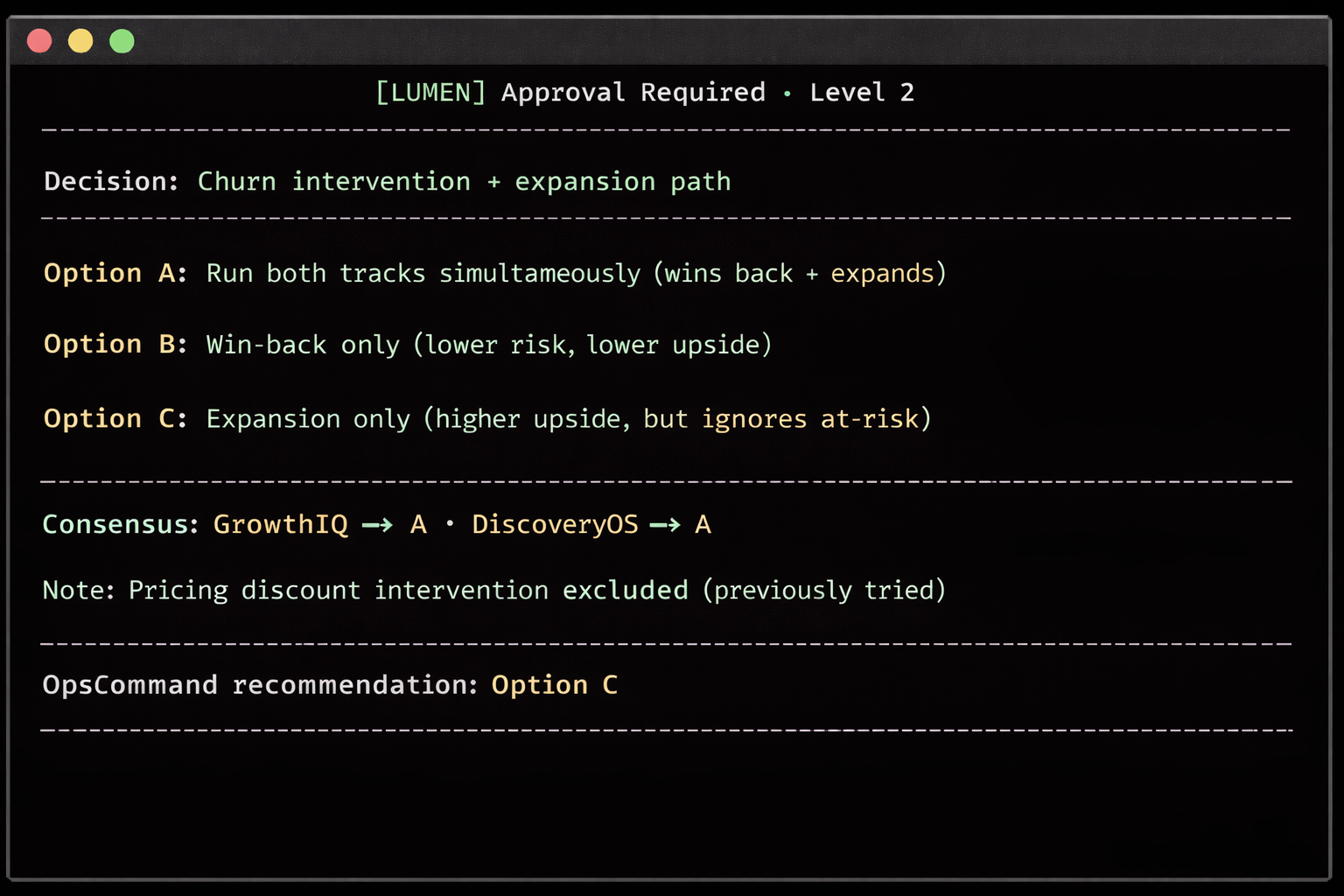
DecideWell → intervention decision [Level 2 gate] (Level 2 if pricing option)
OpsCommand → leadership briefing, 30/60/90-day recovery metrics
Orchestrator → W6 Churn Crisis Report + outcome tracking IDs
Terminal Output Walkthrough
[LUMEN] SignalMonitor · Churn signal assessment...
✓ PostHog + Stripe + HubSpot connected
crisis_severity_score: 5.8/10 — TARGETED INTERVENTION (not full crisis)
(Threshold for full crisis: > 7.0)
churn_attribution_type: PRODUCT (stabilizing)
Roadmap editor fix shipped 3 weeks ago
Positive signal: roadmap_update events recovering (+24% vs. trough)
Risk signal: 2 accounts in affected cohort still showing low engagement
[LUMEN] EventIQ · Behavioural forensics...
✓ churn_cohort_fingerprint: 2026-03 product regression, post-fix recovery cohort
Recovery cohort (re-engaged after fix): 68% of affected users ✓
At-risk residual cohort (still disengaged): 32% of affected users ⚠
Action: Residual cohort needs direct outreach — they did not self-recover
[LUMEN] GrowthIQ · NRR decomposition...
✓ Stripe + HubSpot connected
NRR decomposition — last 30 days:
Starting MRR: $43,020
Expansion: +$2,840 (+6.6%) — 3 Team plan seat additions
Contraction: -$980 (-2.3%) — 2 downgrades from annual to monthly
Churn: -$1,840 (-4.3%) — 4 accounts cancelled
Net MRR: $43,040
NRR: 100.0% ← stabilizing (was 89.2% 30 days ago)
NRR trend: 89.2% → 94.1% → 100.0% (recovering)
Forecast: 102–104% next month if expansion continues + residual churn stops
At-risk accounts (ARR × renewal proximity × health score):
1. Synthex Labs $28,400/yr renews Apr 2 health 4.1/10 ⚠ CRITICAL
2. Waypoint Studios $12,600/yr renews Apr 18 health 5.2/10 ⚠ HIGH
3. Cobalt Systems $9,200/yr renews May 3 health 6.1/10 WATCH
Upsell pipeline:
PQL alerts: 4 Team plan accounts showing Org plan usage patterns
Opportunity: $48,000 ARR potential if these 4 convert to Org plan
[LUMEN] HypothesisLab · Intervention design...
✓ Two-track experiment:
Track A — Win-back (residual disengaged cohort):
Intervention: Concierge onboarding session for the 32% who did not self-recover
Hypothesis: Direct onboarding call will reactivate and reduce cancellation risk
Success metric: Weekly Active Teams status restored within 14 days
Sample: n=38 accounts (full residual cohort) · Run time: 2 weeks
Track B — Expansion (PQL accounts):
Intervention: Triggered in-app upgrade prompt for accounts showing Org patterns
Success metric: ≥1 Org plan upgrade within 30 days
Sample: n=4 accounts · Run time: 30 days
At the Level 2 gate:
> APPROVE
Reading the W6 Report
NRR Decomposition — The most important section for a product leader. It breaks NRR into expansion, contraction, and churn. Each component is a different problem with a different solution. Contraction (downgrades) is usually a pricing or packaging problem. Churn is usually a product or fit problem. Expansion below expectations is usually an activation or upsell motion problem.
NRR Trend — W6 shows the trend across the last three data points (if prior runs exist in the Knowledge Graph). A recovering trend is not the same as a recovered NRR. You need three consecutive improving data points before you stop treating churn as a risk.
At-Risk Account List — The accounts ranked by urgency. Read the health score alongside the renewal date. An account with a health score of 4.1/10 renewing in 8 days needs a phone call today, not a win-back email campaign.
PQL Alerts — GrowthIQ surfaces product-qualified leads: accounts on lower tiers who are exhibiting usage patterns consistent with the next tier up. These are expansion opportunities that your sales team can act on immediately. This section often contains the most actionable short-term revenue opportunity in the report.
Win-back Playbook — GrowthIQ produces a sequenced win-back plan per account tier. The playbook distinguishes accounts that need a personal call (high ARR, recent engagement) from accounts that need an automated sequence (lower ARR, dormant for 30+ days). Do not apply the same playbook to both groups.
Leadership Briefing — If Supabase is connected and a prior W6 run exists, OpsCommand leads with the NRR delta since the last run. This is the format for a standing weekly or monthly revenue update to a CEO or board.
Common Mistakes
Running W6 only when there is a crisis. W6 is most valuable as a standing habit. Monthly W6 runs with outcome tracking build a baseline. When something changes, you have a comparison point. Running W6 for the first time during a crisis means you have no baseline.
Ignoring PQL alerts. The expansion section of the report is often treated as secondary because it is not about preventing churn. This is backwards. A 105% NRR is not just about stopping churn — it requires expansion. PQL alerts are the fastest path to expansion revenue that does not require new sales.
Acting on the at-risk list with the wrong intervention. A CSM email to an account with a 4.1/10 health score renewing in 8 days is not sufficient. That account needs a call. The playbook specifies the right intervention by account tier. Follow it.
Not recording what interventions have already been tried. If you have run a win-back campaign, an outreach sequence, or a concierge call, include it in your prompt. DecideWell excludes previously tried options. Without this context, you may get a recommendation for an intervention that did not work last month.